What is Kubernetes?
Kubernetes (often abbreviated as K8s) is an open-source platform that automates deploying, scaling, and operating containerized applications. It was originally designed by Google and is now maintained by the Cloud Native Computing Foundation (CNCF). With Kubernetes you can run applications across clusters of machines while letting the control plane handle scheduling, failover, and service discovery.
Why Kubernetes?
Kubernetes has become the de facto standard for container orchestration due to its powerful abstractions and extensibility. It enables developers to focus on building applications without worrying about the underlying infrastructure. Key benefits include:
- Scalability: Easily scale applications up or down based on demand.
- Self-healing: Automatically restarts failed containers, replaces and reschedules them when nodes die.
- Service discovery and load balancing: Exposes containers using DNS names or IP
- Auditing and monitoring: Integrates with logging and monitoring tools to provide insights into application performance.
Note that (warning, this is a hot take) Kubernetes can match to many use cases, even without the need for a full-blown microservices architecture or high availability, you can use it to simply manage containerized workloads on a single node cluster.
Core concepts
Control plane vs. worker nodes
- Control plane: hosts components like the API server, scheduler, and controllers. It makes global decisions and exposes the Kubernetes API.
- Worker nodes: run your application workloads inside containers. Each node hosts a kubelet (agent) and a container runtime (containerd, CRI-O, etc.).
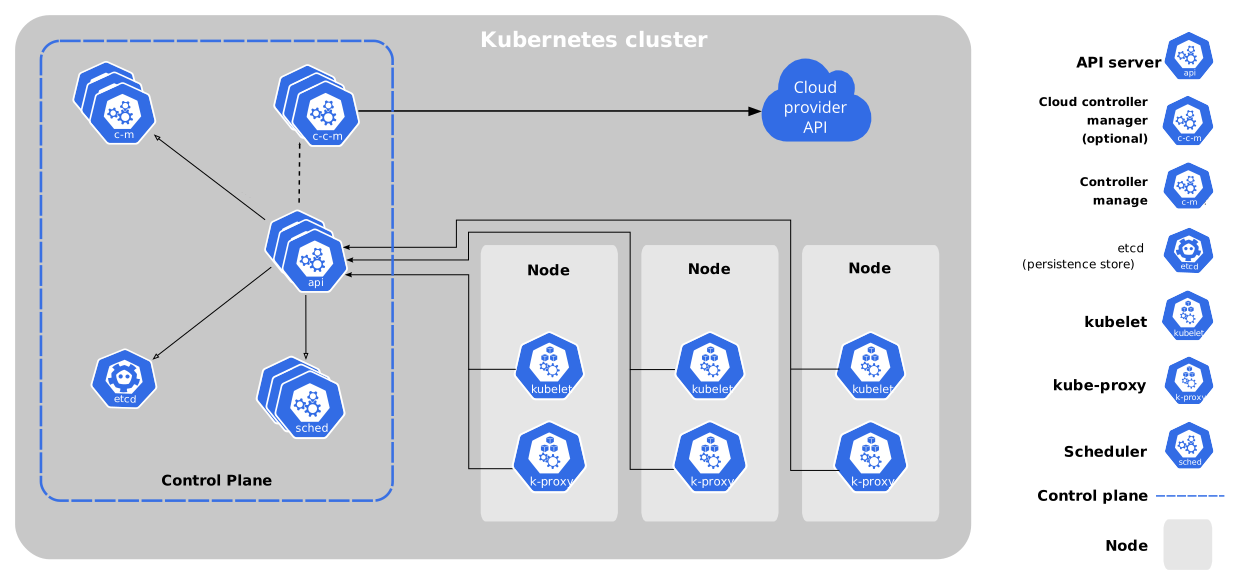
Control plane components can run on dedicated nodes or be co-located with worker nodes in smaller clusters.
Pods
Pods are the smallest deployable unit in Kubernetes. A pod usually wraps a single container, but multiple tightly coupled containers can run inside one pod when they must share storage or networking.
apiVersion: v1
kind: Pod
metadata:
  name: my-pod
spec:
  containers:
      - name: my-container
        image: nginx:latest
        ports:
            - containerPort: 80
Services
Services provide a stable virtual IP (ClusterIP) or endpoint for a set of pods. They abstract away pod IP churn and can also expose workloads outside the cluster via NodePort, LoadBalancer, or Ingress resources.
apiVersion: v1
kind: Service
metadata:
    name: my-service
spec:
    selector:
        app: my-app
    ports:
        - protocol: TCP
          port: 80
          targetPort: 8080
    type: ClusterIP
Deployments
Deployments manage the lifecycle of replicated pods. You declare the desired number of replicas and Kubernetes ensures the actual state matches (self-healing). Rolling updates and rollbacks are handled automatically.
apiVersion: apps/v1
kind: Deployment
metadata:
  name: web-frontend
spec:
  replicas: 3
  selector:
    matchLabels:
      app: web
  template:
    metadata:
      labels:
        app: web
    spec:
      containers:
        - name: nginx
          image: nginx:1.27
          ports:
            - containerPort: 80
          env:
            - name: APP_MESSAGE
              valueFrom:
                configMapKeyRef:
                  name: web-config
                  key: welcome-message
ConfigMaps and Secrets
- ConfigMaps: store non-sensitive configuration data so you can decouple config from container images.
- Secrets: same pattern as ConfigMaps but designed for sensitive data (credentials, certificates). They are base64 encoded and can be encrypted at rest.
apiVersion: v1
kind: ConfigMap
metadata:
  name: web-config
data:
  welcome-message: "Hello Talos workshop!"
  feature-flags: |
    enableCaching=true
    showBetaBanner=false
How to deploy Kubernetes?
- Kubeadm: official tool to bootstrap a minimal cluster.
- Managed services: EKS (AWS), GKE (GCP), AKS (Azure) offer fully managed Kubernetes clusters.
- Ansible with Kubespray: for more control over cluster configuration.
- K3s/K0s: lightweight Kubernetes distribution for edge and IoT.
- Talos Linux: purpose-built OS for running Kubernetes clusters with an API-driven approach.
Why Kubernetes matters for the Talos workshop
Talos Linux provides a minimal, API-driven operating system for running Kubernetes control planes and worker nodes. Understanding Kubernetes basics helps you:
- Validate that Talos nodes joined your cluster and became Ready.
- Deploy Talos machine configs that reference Kubernetes resources (manifests, patches).
- Use
kubectlto inspect pods, services, and events when troubleshooting. - Scale your workshop workloads (add replicas, expose services) without touching the underlying VMs.
Next steps
If you are brand new to Kubernetes, practice the following commands once your Talos cluster is up:
kubectl get nodes
kubectl get pods -A
kubectl describe pod <pod-name> -n <namespace>
These commands let you confirm node status, list workloads across namespaces, and inspect pod-level events/logs. Armed with these fundamentals, you will navigate the rest of the workshop much more confidently.